Environment
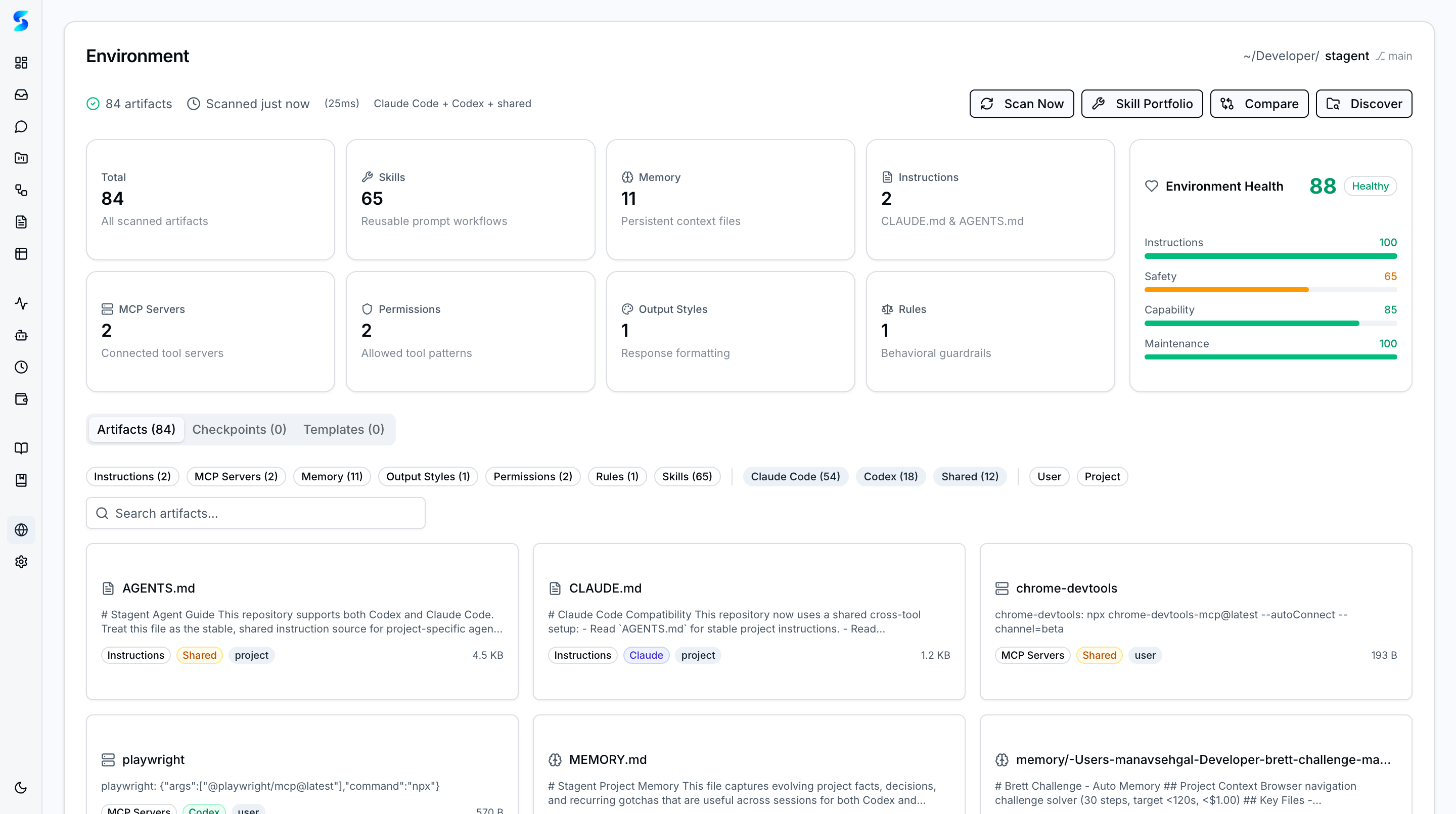
The environment surface turns Stagent into a control plane for your development environments. Scan Claude Code and Codex CLI setups to discover artifacts, assess health, compare configurations across projects, and bootstrap new projects from proven templates.
Key Concepts
- Environment Scanner — Automatically discovers CLAUDE.md files, MCP server configs, skills, rules, permissions, output styles, templates, and checkpoints across your projects.
- Health Scoring — A composite score rates your environment across four dimensions: Instructions, Safety, Capability, and Maintenance — with actionable recommendations for improvement.
- Artifact Inventory — Browse all discovered artifacts organized by type (MCP Servers, Memory, Output Styles, Permissions, Rules, Skills, Claude Code, Codex, Shared) with counts and metadata.
- Cross-Project Comparison — Compare environment configurations side-by-side across projects to identify gaps, inconsistencies, or reuse opportunities.
- Skill Portfolio — Catalog and manage your Claude Code skills with metadata, usage patterns, and reuse statistics.
How It Works
When you trigger a scan, the environment scanner crawls your project directories for known artifact patterns — .claude/ directories, CLAUDE.md files, MCP server configurations, skill definitions, and more. Results are cached for fast subsequent access, with timestamps showing when each scan completed.
The dashboard presents a high-level overview with stat cards for total artifacts, rules, memory files, MCP servers, output styles, permissions, and rules. The health score provides an at-a-glance assessment with color-coded ratings for each dimension.
Below the overview, tabbed artifact views let you drill into specific categories. Each artifact shows its source, type badges (User/Project scope), and a relevance score.
Use Cases
New Project Bootstrap
Developer · Setting up a fresh project with proven configurations
Scan an existing well-configured project, then use environment templates to bootstrap a new project with the same MCP servers, permissions, and rules — without manual copy-paste.
Configuration Audit
Tech Lead · Ensuring consistent agent setups across team projects
Run the cross-project comparison to identify which projects are missing safety rules, have outdated MCP configs, or lack proper permissions. The health score highlights projects that need attention.
Skill Discovery
Power User · Finding and reusing skills across environments
The skill portfolio surfaces all available skills with metadata, making it easy to discover capabilities you’ve built in one project and reuse them in another.
Related Features
- Settings — Configure provider authentication and permissions
- Agent Integration — Runtime adapters that the environment scanner discovers
- Profiles — Agent profiles can be auto-generated from environment analysis